Buying a gaming PC in Japan can be a challenge for non-Japanese speakers, as most retailers’ websites are written entirely in Japanese. Even with Google Translate, the content isn’t always fully understandable.
That’s why we’ve picked out a selection of gaming desktop PCs you can order online in Japan. As gaming PC experts, we introduce the models that are popular here. If you have any questions, feel free to reach out — leave a comment or email us at wordpress @ gamingpcs.jp (please remove the spaces around the “@”).
You can now choose from gaming PCs featuring Intel Core Ultra Series 2 or AMD Ryzen 9000/7000 series CPUs, paired with NVIDIA’s Blackwell generation or AMD’s RDNA 4 generation GPUs. As CPUs and GPUs keep improving, gaming PCs deliver better performance than ever. On the other hand, surging demand for AI has sent PC parts prices soaring. Still, if your current low-spec PC is getting in the way of your gaming, it’s time to get a new one.
In this guide you’ll find our ranked picks, a comparison table, a step-by-step ordering walkthrough with screenshots, advice on choosing the right machine, and an FAQ for buyers from overseas.
The best gaming desktop PCs in Japan 2026
Here are our three picks for 2026, each the best in its category. If you’re in a hurry, this table sums it all up — click a model name to jump to the details.
| Model | Best for | CPU / GPU | Price |
|---|---|---|---|
| THIRDWAVE AD-R7A57A-01W (Dospara) | Best overall — 1440p / 144 Hz | Ryzen 7 7700 / RTX 5070 | 229,980 yen |
| NEXTGEAR JG-A7G6T (Mouse) | Best for Full HD — budget & white case | Ryzen 7 5700X / RTX 5060 | 234,980 yen |
| OMEN 35L Stealth Edition (HP) | Best high-end — 4K-ready | Ryzen 7 9800X3D / RX 9070 XT | 359,800 yen |
THIRDWAVE AD-R7A57A-01W (Dospara)
THIRDWAVE AD-R7A57A-01W
Ryzen 7 7700 × RTX 5070
Dospara
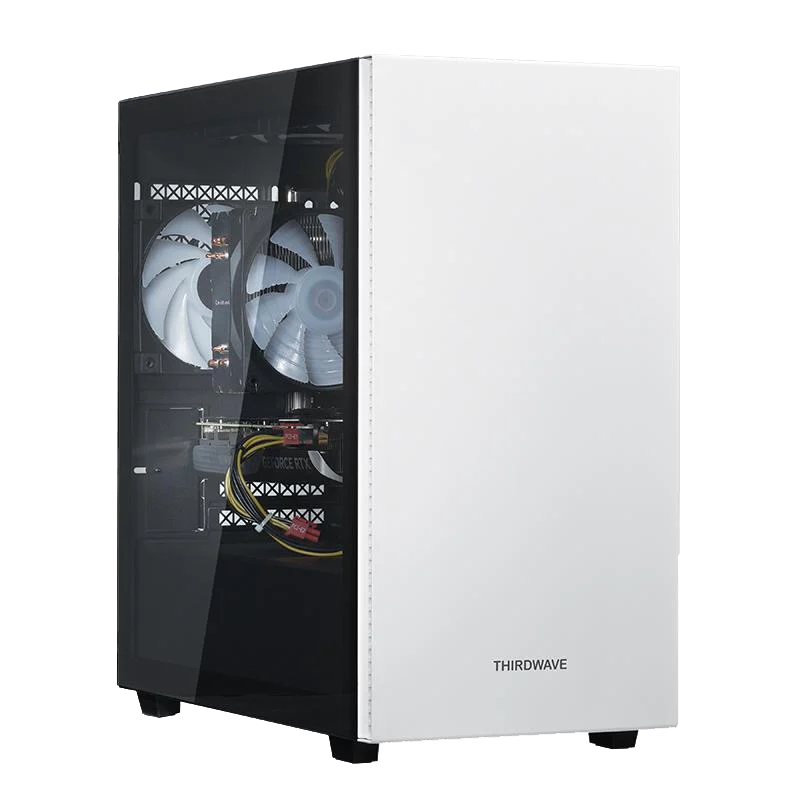
| Price | 229,980 yen |
|---|---|
| CPU | AMD Ryzen 7 7700 |
| GPU | GeForce RTX 5070 |
| Memory | DDR5 16GB |
| SSD | 500GB Gen4 NVMe |
| PSU | 750W (80PLUS GOLD) |
| Motherboard | AMD A620A chipset |
Dospara is one of Japan’s most popular BTO (build-to-order) PC brands, run by THIRDWAVE Inc. in Sotokanda, Akihabara. Japanese gamers rate it highly for its solid support, cost-effective machines and fast delivery.
The AD-R7A57A-01W gives you more bang for your buck than almost any other PC in its class — the Ryzen 7 7700 × RTX 5070 combo comfortably handles high-refresh-rate gaming at 144 Hz. To give you an idea, esports titles like Apex Legends and VALORANT run well above 144 fps at Full HD, and most modern AAA titles stay around 100 fps or more at 1440p with DLSS enabled.
Next-day deliveryThis is an off-the-shelf model: order and complete payment by 11:00, and it will arrive the next day.
Mouse NEXTGEAR JG-A7G6T (Mouse Computer)
Mouse NEXTGEAR JG-A7G6T
Ryzen 7 5700X × RTX 5060
Mouse Computer
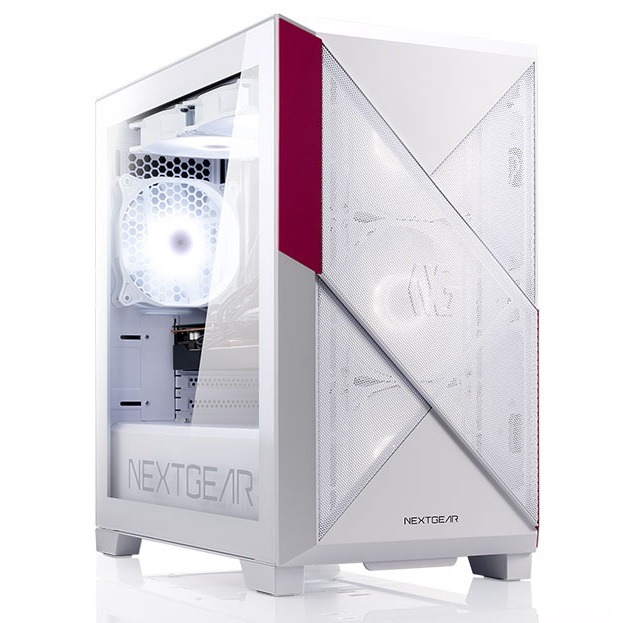
| Price | 234,980 yen |
|---|---|
| CPU | AMD Ryzen 7 5700X |
| CPU Cooler | Liquid cooling (AIO) |
| GPU | GeForce RTX 5060 |
| Memory | DDR4 16GB |
| SSD | 500GB Gen4 NVMe |
| PSU | 650W (80PLUS BRONZE) |
| Motherboard | AMD B550 chipset |
| Warranty | 3 years (standard, free) |
Mouse Computer is one of Japan’s best-known gaming PC brands. Backed by the major PC group MCJ, it has a long track record in Japan, so you can count on reliable products and solid after-sales support.
The NEXTGEAR JG-A7G6T is a white mini-tower gaming PC — a rare find, as most gaming PCs in Japan only come in black. The Ryzen 7 5700X × RTX 5060 combo is a great match for Full HD gaming: expect roughly 100–144 fps in Apex Legends, well over 200 fps in VALORANT, and playable 60 fps in demanding titles like Monster Hunter Wilds with upscaling. DDR4 memory isn’t the fastest option for this system, but it helps keep the price down. On top of that, it comes with an all-in-one liquid CPU cooler — rare in this price range — that keeps the CPU cool and quiet even during long gaming sessions.
3-year warrantyEvery NEXTGEAR comes with a free 3-year warranty and 24/7 phone support — most Japanese BTO brands only give you 1 year, so this is a big plus for buyers living in Japan.
HP OMEN 35L Stealth Edition (HP)
OMEN 35L Stealth Edition Obscure Model
Ryzen 7 9800X3D × RX 9070 XT
HP
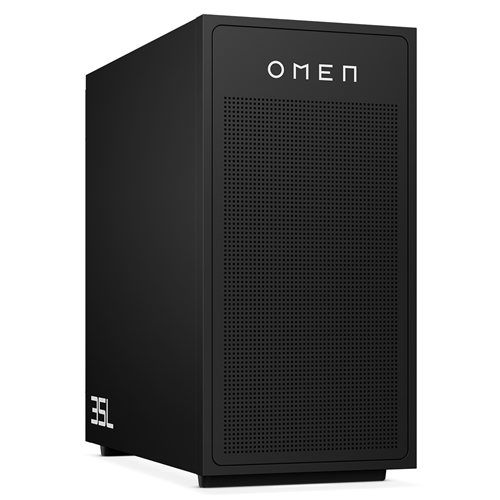
| Price | 359,800 yen |
|---|---|
| CPU | AMD Ryzen 7 9800X3D |
| CPU Cooler | Liquid cooling (AIO) |
| GPU | Radeon RX 9070 XT |
| Memory | DDR5 32GB |
| SSD | 1TB Gen4 NVMe |
| PSU | 850W (80PLUS GOLD) |
| Motherboard | AMD B850 chipset |
HP is a global PC maker headquartered in California, USA. You can browse OMEN gaming desktops on the US website in English, but HP doesn’t offer international shipping — so if you find a model you like, you’ll need to order it from the Japanese site anyway.
The OMEN 35L is a new line of HP’s OMEN series, with a much more modern, stylish look than older OMEN desktops. The Ryzen 7 9800X3D — the best gaming CPU you can get right now — paired with the Radeon RX 9070 XT handles 4K gaming with FSR upscaling and ray tracing: expect around 60 fps or more at 4K in demanding AAA titles, and effortless high-refresh-rate play at 1440p. It costs more than Dospara or Mouse Computer machines, but HP regularly issues coupon codes, so check for a discount before ordering.
Café de OMENEvery OMEN buyer can use Café de OMEN free for one year — a gaming-dedicated phone support desk where every staff member is a PC gamer. They’ll help with game settings, troubleshooting, and even hooking up third-party gaming gear, as many times as you need (support is in Japanese).
How to purchase a gaming PC online in Japan (step by step)
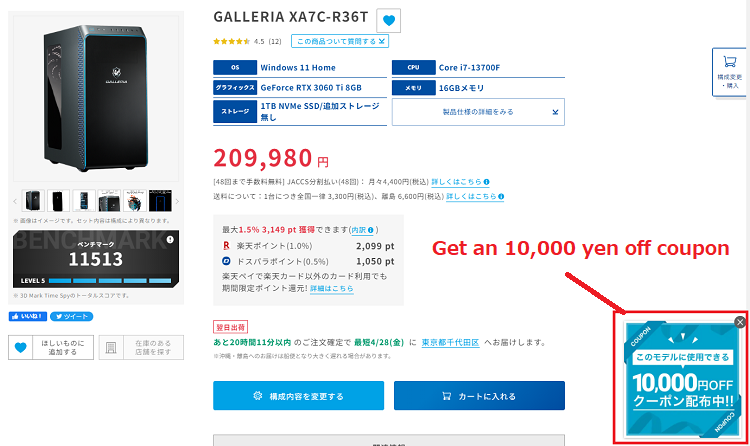
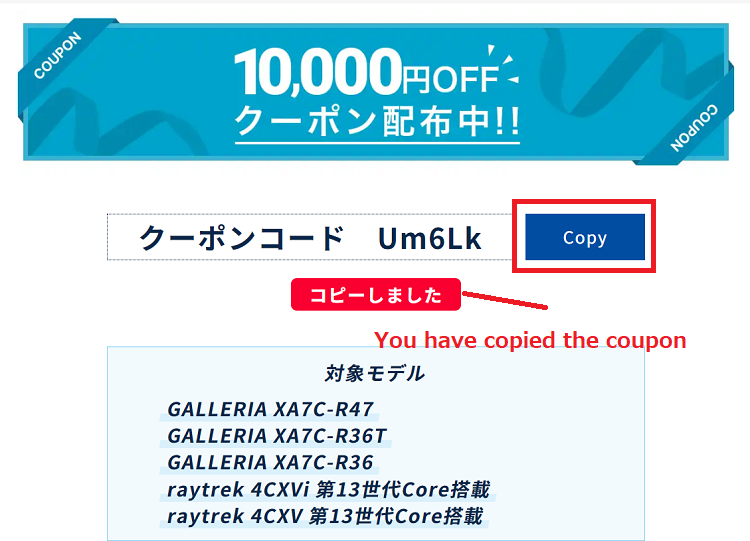
Here we walk you through a real order on Dospara, screenshot by screenshot. The flow is almost identical at Mouse Computer and other BTO shops, so you can use this as a template for any of them.
-
1. Access the Dospara site and get a coupon
-
2. Copy the coupon code
-
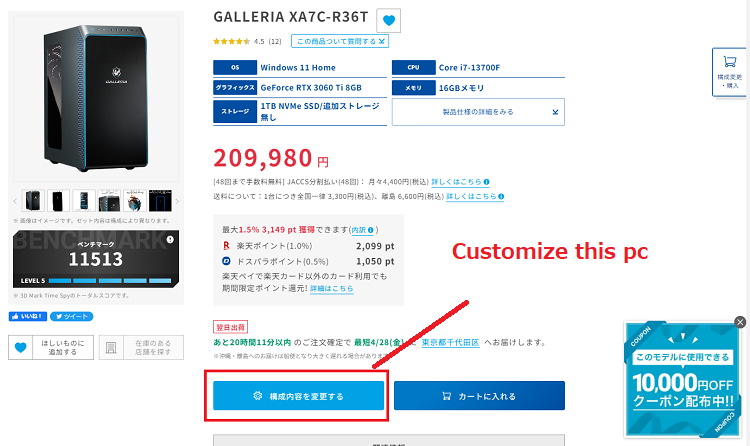
3. Click the “Customize this PC” button (on the left)
-
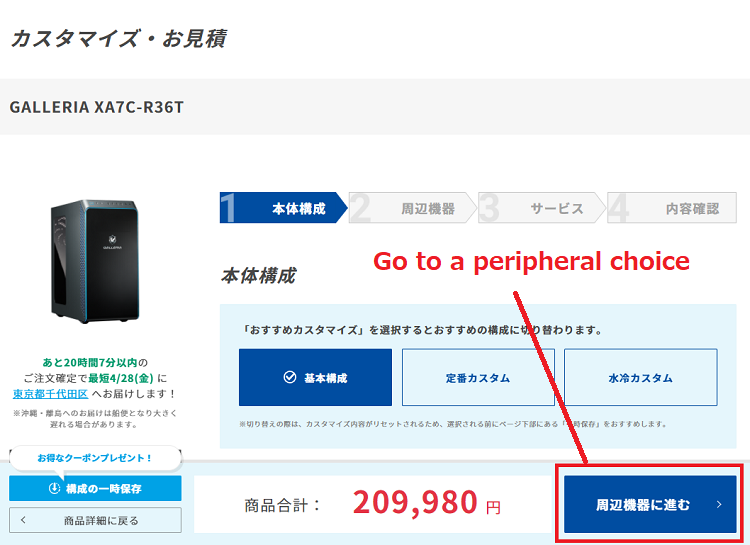
4. Change the CPU fan, power supply and so on if you like, then click the “Go to peripheral choice” button
-
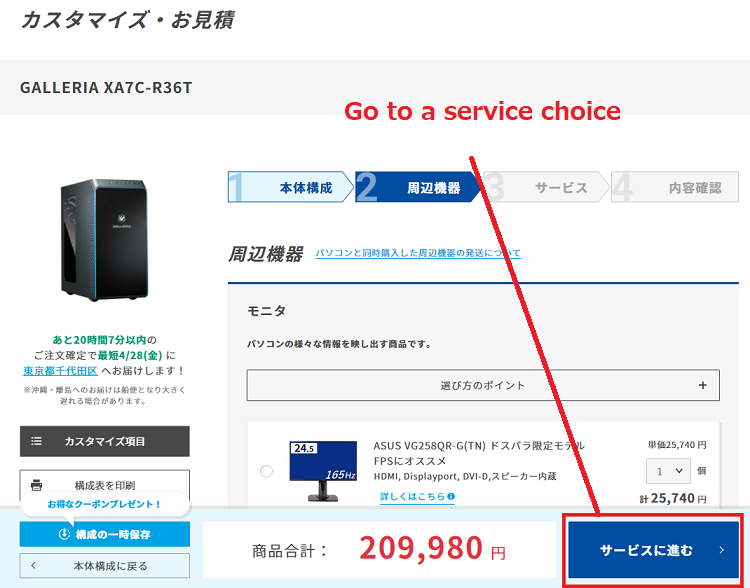
5. Add a monitor, keyboard or mouse if you need one, then click the “Go to service choice” button
-
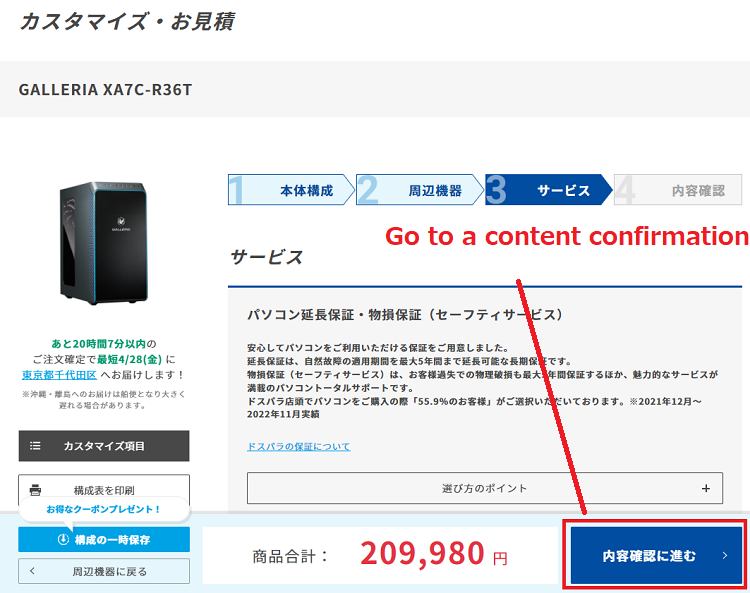
6. Add optional services such as an extended warranty, then click the “Go to content confirmation” button
-
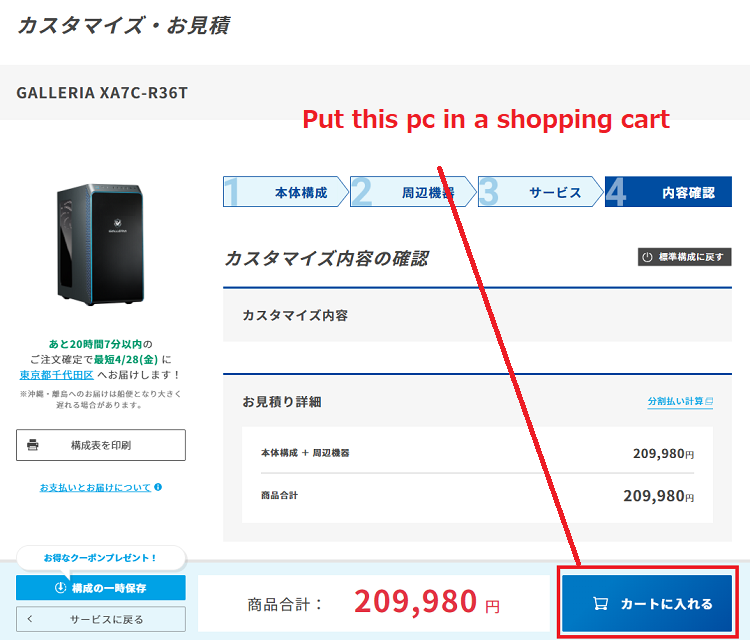
7. Check your order, then click the “Put this PC in the shopping cart” button
-
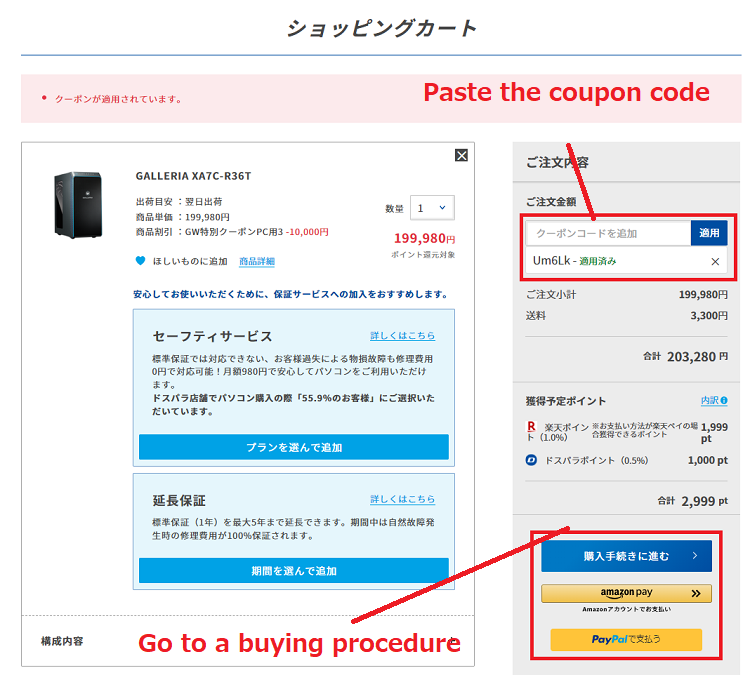
8. Paste the coupon code you got in step 1, then click the “Go to buying procedure” button
-
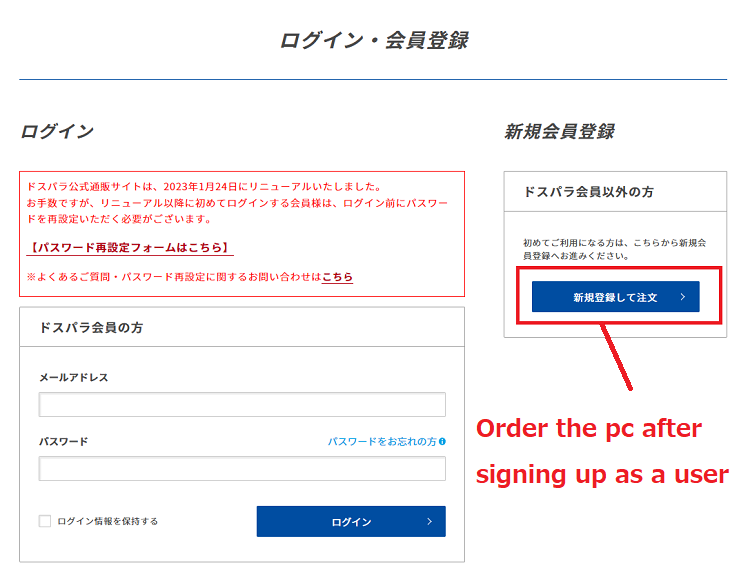
9. Click the “Order the PC after signing up as a user” button
-
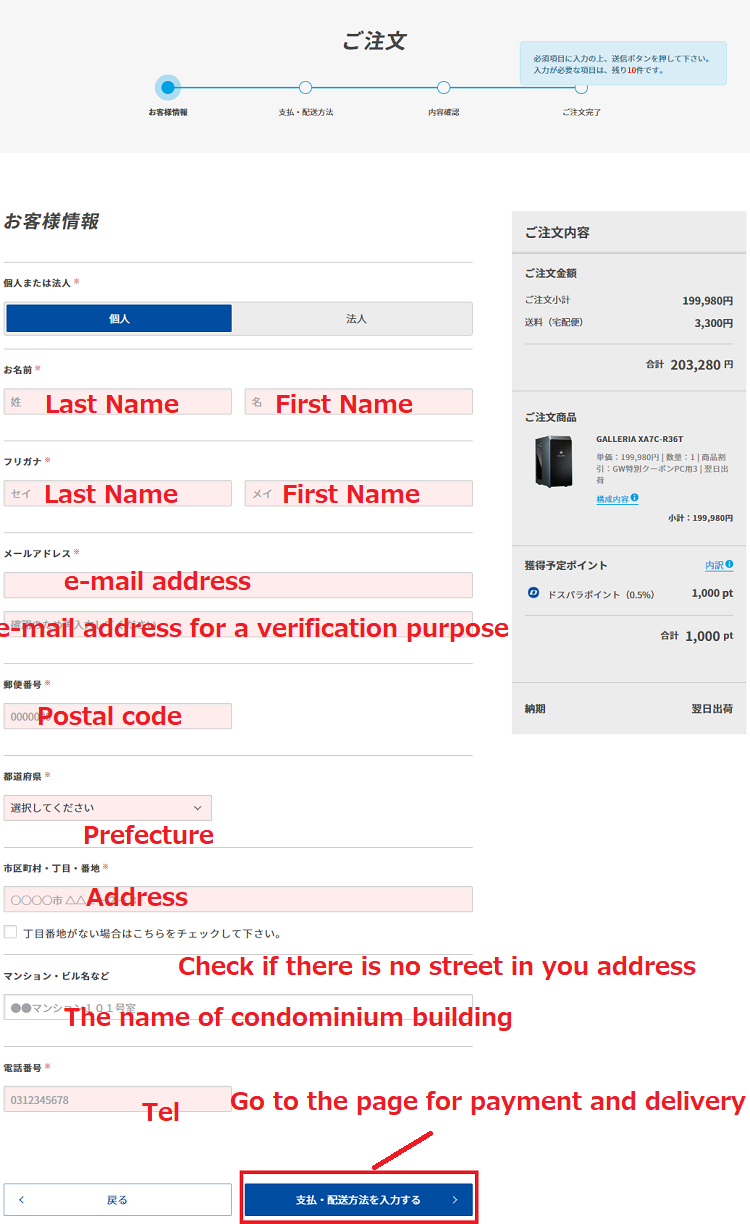
10. Fill in the form, then click the “Go to the payments and delivery page” button at the bottom
-
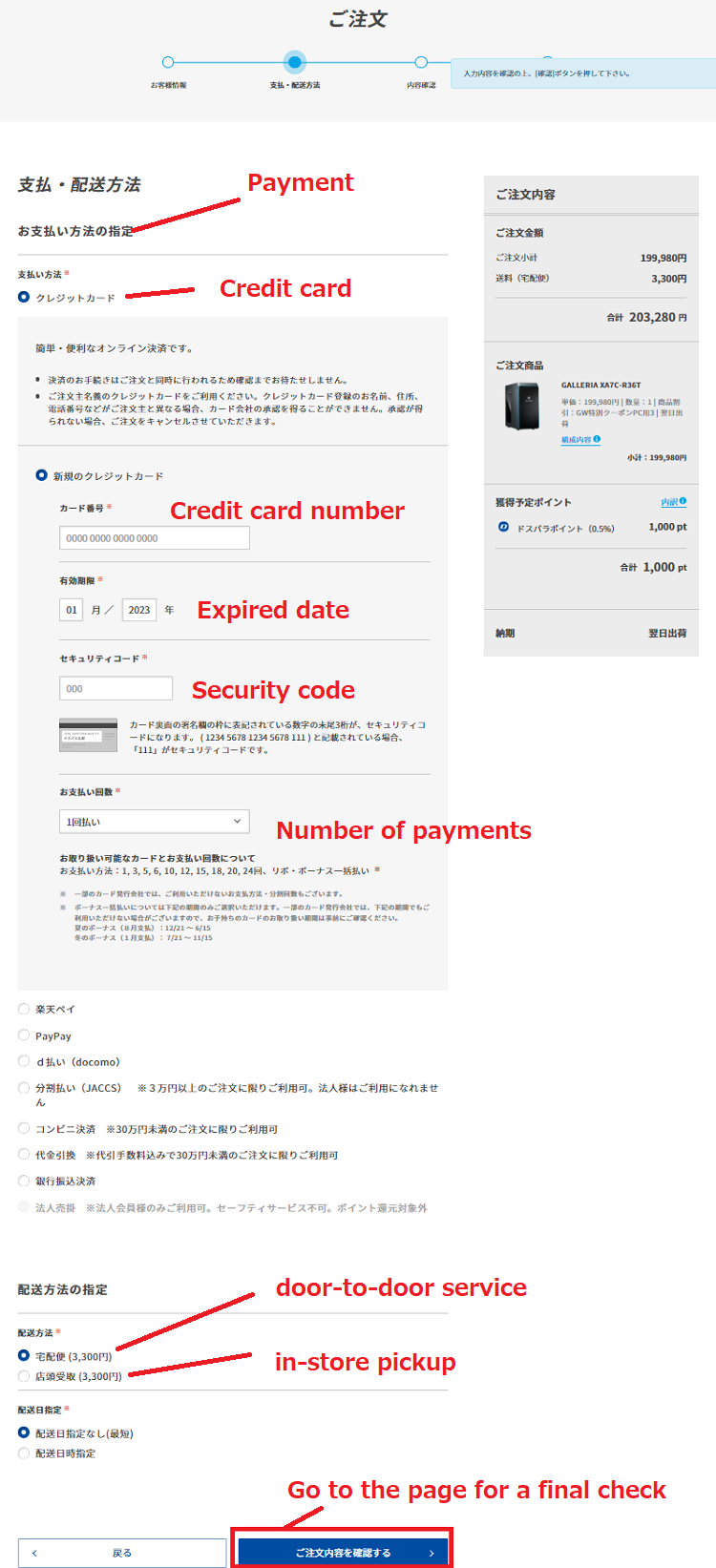
11. Choose your payment method and fill in the details, then click the “Go to the final check page” button
-
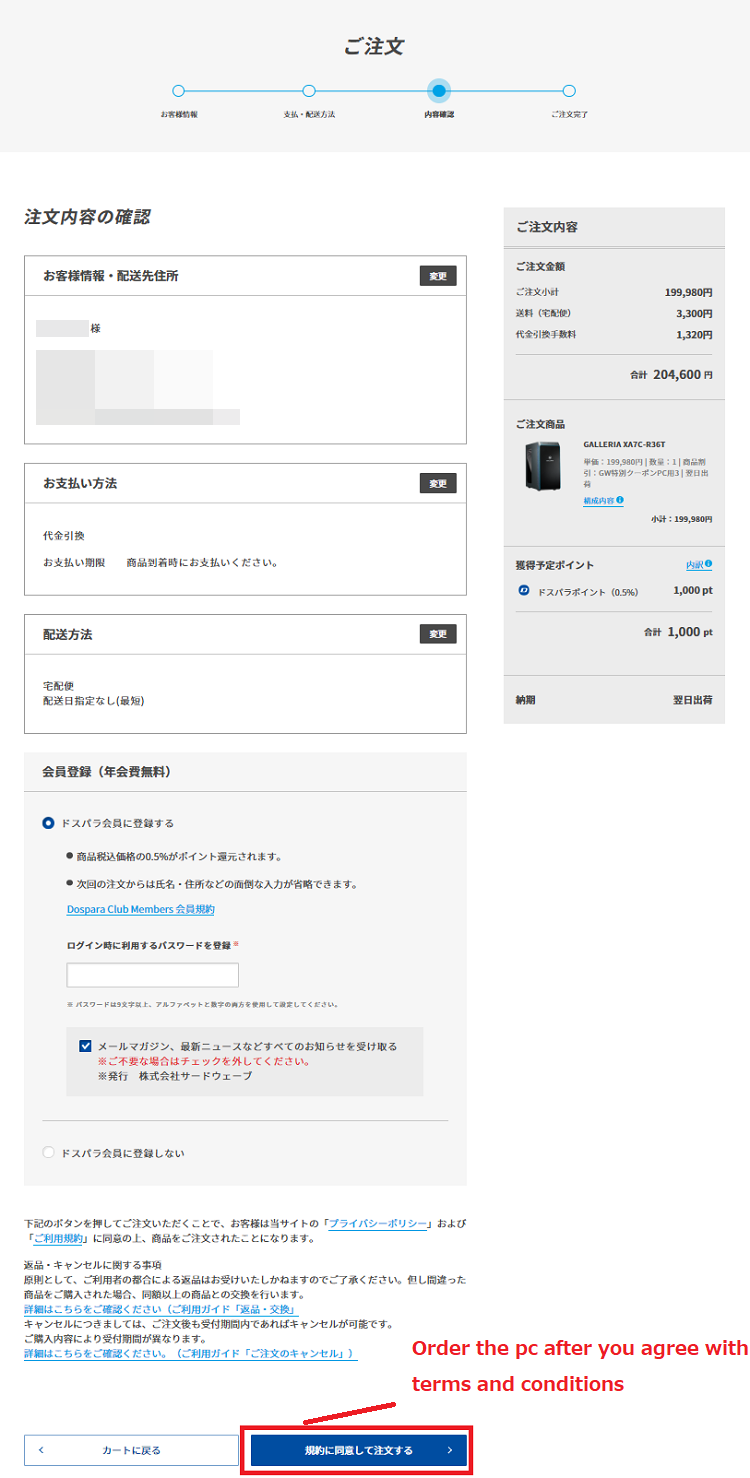
12. Make sure your order is correct, then click the “Order the PC after agreeing to the terms and conditions” button
How to choose the best gaming PC
-
1. Set a budget
First, decide how much you can spend on a gaming PC. Performance-wise, around 150,000 yen (tax included) is a good baseline — below that, you’ll have to compromise on gaming performance. -
2. Think about what resolution you play at
What resolution do you usually play at — Full HD, or up to 4K? This makes a big difference to which PC you should choose. Most players game at Full HD, where a mid-range GPU like the GeForce RTX 5060 is enough. For 1440p or 4K, look at the RTX 5070 or above. -
3. Think about what titles you’re going to play
Game titles are a handy reference for choosing a PC. Brand-new titles tend to be demanding, so they call for a high-performance model. On the other hand, if you mainly play older titles, there’s no need to pay for an expensive machine. -
4. Study PC parts closely (for the experienced)
If you already know your way around PC parts, comparing CPUs and GPUs yourself is the surest way to pick the right machine. Tom’s Hardware has excellent up-to-date rankings of CPUs and graphics cards.
Guide to choosing PC parts
A gaming computer is a collection of PC parts, so knowing the basics of each one helps you make a good choice.
CPU
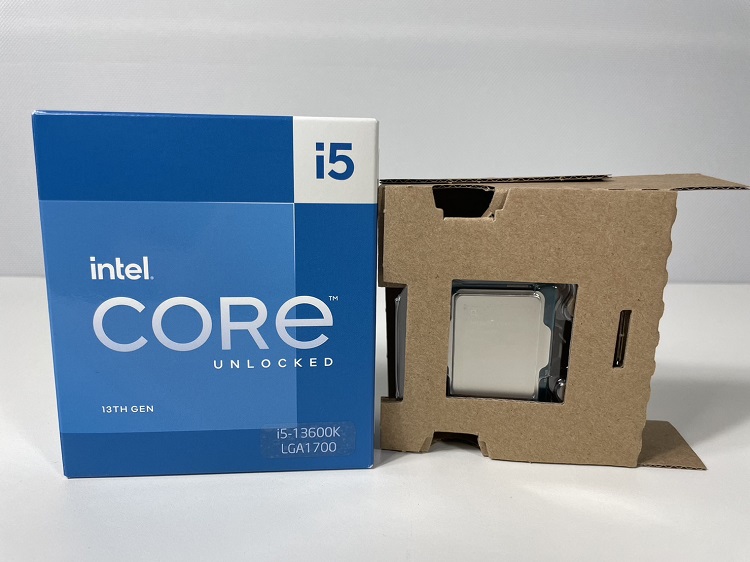
CPU stands for Central Processing Unit — literally the center of the computer, often called its “brain”. It processes all kinds of data such as files and images. For gaming, a Core i5 / Ryzen 5 class CPU or above is a great choice.
Graphics cards
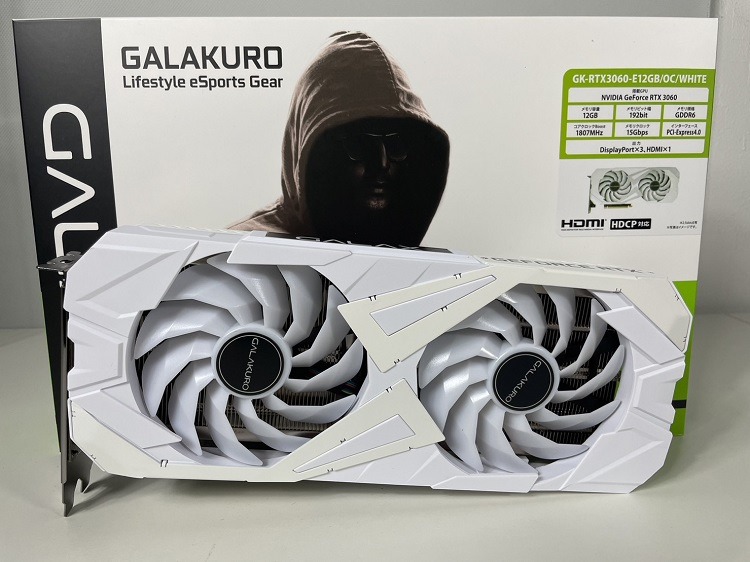
The graphics card plays the most crucial role in gaming, because image quality and frame rates depend directly on its performance. For high resolutions like 1440p or 4K, choose a GeForce RTX 5060 Ti or above. For Full HD, a mid-range card such as the GeForce RTX 5060 will meet your needs.
Memory (RAM)
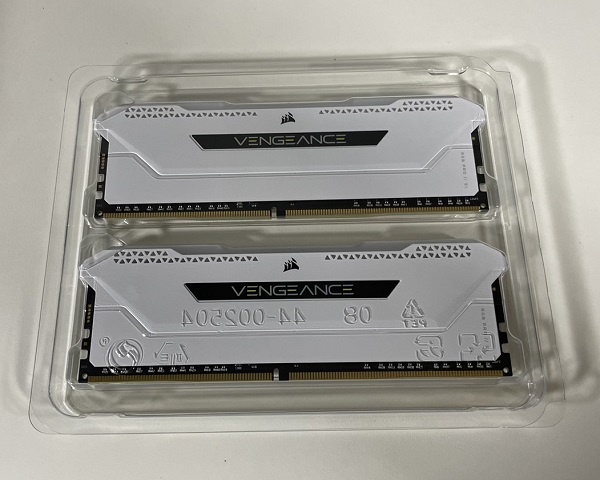
RAM (random access memory) is easy to overlook but important for gaming. While you play, a lot of data is stored and processed in RAM, and if it runs short, the game lags or the whole PC slows down. 16 GB is now the standard for gaming PCs and what we recommend — some titles use more than 8 GB, so avoid 8 GB models. DDR5 is faster than DDR4 on paper, but in real-world gaming the difference is hard to notice.
Storage
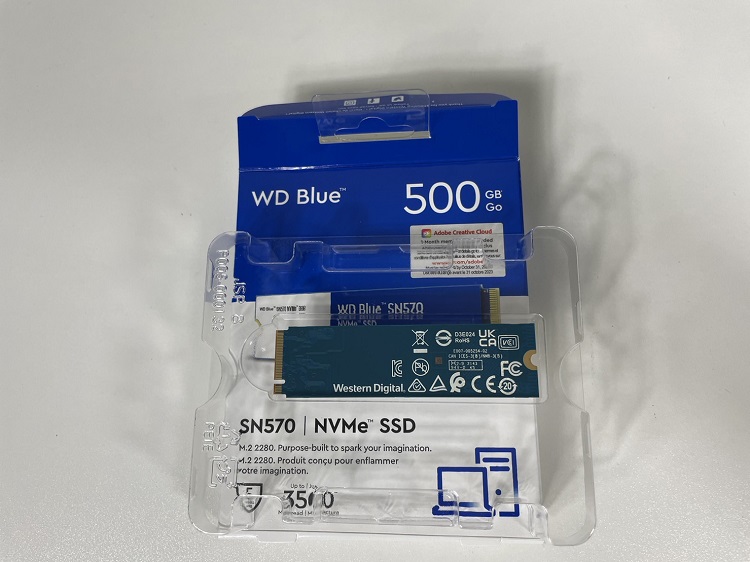
Computers use two types of storage: SSDs and HDDs. SSDs are much faster, and while they used to be reserved for high-end models because of their cost, today almost every gaming PC — even entry-level ones — comes with an SSD. Installing your OS and games on an SSD makes everything feel quick, from boot times to game loading.
Power units
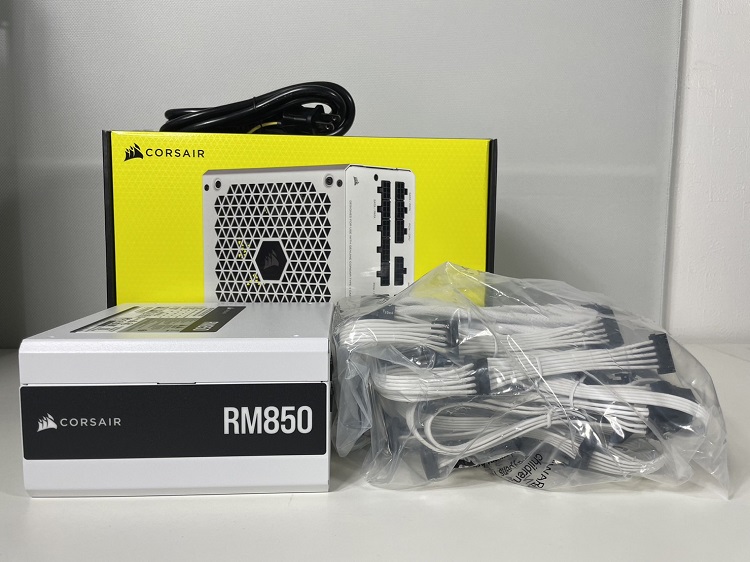
The power supply unit (PSU) provides a stable flow of electricity to the whole system. An 80 PLUS certified unit is a good option, as it converts power more efficiently. Make sure the wattage has enough headroom for your GPU — if the PSU can’t supply enough power, the PC may shut down under load.
FAQ: buying a gaming PC in Japan as a foreigner
Can I pay with a foreign credit card?
Most Japanese BTO shops accept major card brands (Visa, Mastercard, JCB, American Express), but cards issued overseas are sometimes declined by the shop’s fraud filter. If that happens, don’t give up — most shops also offer convenience-store payment (konbini-barai), bank transfer, and PayPay or other QR payments, all of which work fine with a Japanese bank account or cash.
Can I enter my address in English?
Order forms are in Japanese and expect a Japanese-format address. Romaji (Latin letters) usually works in the address fields, but many forms also require a furigana (katakana) version of your name — you can generate one with any romaji-to-katakana converter. Enter your postal code first and most forms will auto-fill the prefecture and city for you.
Do these shops ship overseas?
No. Dospara, Mouse Computer and HP Japan all ship within Japan only. You’ll need a Japanese shipping address — your home, office, or a friend’s place.
Is customer support available in English?
Phone and chat support at Japanese BTO shops is basically Japanese-only. If your Japanese isn’t strong, email support is easier because you can use a translator on both sides. Global brands like HP also have extensive English documentation and drivers on their international sites, which is a plus for troubleshooting.
Will Windows be in Japanese?
PCs sold in Japan come with Japanese Windows 11, but you can switch the display language to English (or any other language) for free: Settings → Time & language → Language & region → add English and set it as the display language. It takes a few minutes and no reinstall is needed.
How long is the warranty?
The standard warranty at most Japanese BTO shops is 1 year, with paid extensions up to 3–5 years available at checkout. Mouse Computer’s NEXTGEAR line is the exception, including 3 years for free. Keep the invoice email — you’ll need it for warranty service.
Summary
For most people, the THIRDWAVE AD-R7A57A-01W is the one to get — the best balance of price and performance, with next-day delivery. If you game at Full HD and love the white look (or want that 3-year warranty), go for the NEXTGEAR JG-A7G6T. And if you want no-compromise 4K gaming, the OMEN 35L is worth the extra investment. Whichever you choose, the step-by-step ordering guide above will get you through the Japanese checkout — and if you get stuck, leave a comment and we’ll help you out.